Kamis, 04 Agustus 2011

LGEtool v1.20-direct unlock and IMEI repair V909, V909DW, L06C + P999, P999DW support

LGE TOOL
by SeTool Team


OFFICIAL WEB SITE FROM THE TEAM
www.lgtool.net


OFFICIAL SUPPORT FORUM FROM THE TEAM
LGETool Official Support Forum


LGETOOL v 1.20
https://rapidshare.com/files/2331942985/lgetool_120.exe

LGETOOL Updates and news


Added Models:

V909, V909DW, L06C - World first!
- Read/Write NVM
- Read/Write Security
- Read dump full
- Factory reset
- Unlock
- Repair IMEI


P999, P999DW
- Read/Write NVM
- Read/Write Security
- Read dump full
- Factory reset
- Unlock
- Repair Bluetooth
- Repair IMEI


BR,
Manole
LGETool
Continue reading →

Octopus Samsung Software v1.0.6 is here

http://tipsntrik88.files.wordpress.com/2009/02/octopus-box-repair.jpg?w=400&h=400

Octopus Samsung Software v1.0.6
is out! We have added support for Anycall SHW-M100S, SCH-W200, SCH-W550, SCH-W570, SPH-W3000, SPH-W3500, SPH-W4100, SPH-W4700 and SPH-W5700!


Octopus Box Samsung Software v1.0.6 Release Notes:
  • SHW-M100S – added Unlock (by reading codes), Bluetooth address Repair, WiFi address Repair, NVM Read/Write/Repair.
  • SCH-W200 – added Unlock, NVM Read/Write/Repair, Factory Reset. Note: This phone works in WCDMA networks only.
  • SCH-W550 – added Unlock, Firmware Write, Bluetooth address Repair, NVM Read/Write/Repair, Factory Reset, Read user code from Emergency mode.
  • SCH-W570 – added Unlock, Firmware Write, Bluetooth address Repair, NVM Read/Write/Repair, Factory Reset, Read user code from Emergency mode.
  • SPH-W3000 – added Unlock, Firmware Write, Bluetooth address Repair, IMEI repair, NVM Read/Write/Repair, Factory and Hard Reset, Read user code from Emergency mode.
  • SPH-W3500 – added Unlock, Firmware Write, Bluetooth address Repair, NVM Read/Write/Repair.
  • SPH-W4100 – added Unlock, Firmware Write, Bluetooth address Repair, IMEI repair, NVM Read/Write/Repair, Hard Reset, Read user code from Emergency mode.
  • SPH-W4700 – added Unlock, Firmware Write, Bluetooth address Repair, NVM Read/Write/Repair.
  • SPH-W5700 – added Unlock, Firmware Write, Bluetooth address Repair, IMEI repair, NVM Read/Write/Repair, Factory and Hard Reset, Read user code from Emergency mode.
  • SCH-W460, SCH-W350 – added Unlock for one new firmware version.
  • SPH-W7700 – added Unlock for 2 new firmware versions.
  • Improved manuals system.
  • Added manuals for all supported phones.
  • Added new skins.
A big thanks to all our customers who sent reports, logs and dumps to us.


Please be informed that all dumps with unsupported versions will be added in 2 weeks because Octopus Samsung Team is going on a two-week vacation


Download Octopus Box Samsung Software v1.0.6
____________________
WBR,
Octopus Box Team
Continue reading →

Universalbox Update V.2.9.5 (Added SL3 Unlock By USB RAPIDO, RAPU & RAP3Gv4)

Universalbox Update V.2.9.5 (Added SL3 Unlock By USB RAPIDO, RAPU & RAP3Gv4)


  • Added SL3 unlock feature by USB. Supported platforms are RAPIDO, RAPU and RAP3Gv4 for now.
  • Added SD repair feature by USB. Supported platforms are RAPIDO, RAPU and RAP3Gv4 for now.
  • Added BB5 Simlock maintenance feature by USB. Supported platforms are RAPIDO, RAPU and RAP3Gv4 for now.


For more information , Check this out,

Universalbox Update V.2.9.5 (Added SL3 Unlock By USB RAPIDO, RAPU & RAP3Gv4) 03-08-11


HERE IS DOWNLOAD LINK OF LATEST UNIVERSALBOX INSTALLER
DOWNLOAD Latest Installer of Universalbox V2.9.5 (Resume Support)
Continue reading →

Infinity BEST 1.25 added Maemo Flashing ( Meamo Edition )

Whats New in 1.25 Meamo Edition Look here

Infinity BEST 1.25 added Maemo Flashing ( Meamo Edition )

Br
Infinity Team
Continue reading →

New iPhone Firmware Files

https://blogger.googleusercontent.com/img/b/R29vZ2xl/AVvXsEiZRgaeKLNxB47r5Xjioz4I2TEaer6vHmNYrQQhdsSsmzx3RoogpdDgdN6jSud2v-U3zQXcPvY4QE7jReW2C86zhtWoSWCqVnMGq9saapPF3J0vCBwi57h3JAvNCLZJuoqMPotCzS1BERQ/s1600/iphone-firmware-files-300x300.jpg

1.0.0: iPhone1,1_1.0_1A543a_Restore.ipsw
1.0.1: iPhone1,1_1.0.1_1C25_Restore.ipsw
1.0.2: iPhone1,1_1.0.2_1C28_Restore.ipsw
1.1.1: iPhone1,1_1.1.1_3A109a_Restore.ipsw
1.1.2: iPhone1,1_1.1.2_3B48b_Restore.ipsw
1.1.3: iPhone1,1_1.1.3_4A93_Restore.ipsw
1.1.4: iPhone1,1_1.1.4_4A102_Restore.ipsw
2.0.0 (2G): iPhone1,1_2.0_5A347_Restore.ipsw
2.0.0 (3G): iPhone1,2_2.0_5A347_Restore.ipsw
2.0.1 (2G): iPhone1,1_2.0.1_5B108_Restore.ipsw
2.0.1 (3G): iPhone1,2_2.0.1_5B108_Restore.ipsw
2.0.2 (2G): iPhone1,1_2.0.2_5C1_Restore.ipsw
2.0.2 (3G): iPhone1,2_2.0.2_5C1_Restore.ipsw
2.1.0 (2G): iPhone1,1_2.1_5F136_Restore.ipsw
2.1.0 (3G): iPhone1,2_2.1_5F136_Restore.ipsw
2.2.0 (2G): iPhone1,1_2.2_5G77_Restore.ipsw
2.2.0 (3G): iPhone1,2_2.2_5G77_Restore.ipsw
2.2.1 (2G): iPhone1,1_2.2.1_5H1_Restore.ipsw
2.2.1 (3G): iPhone1,2_2.2.1_5H11_Restore.ipsw
3.0.0 (2G): iPhone1,1_3.0_7A341_Restore.ipsw
3.0.0 (3G): iPhone1,2_3.0_7A341_Restore.ipsw
3.0.0 (3GS): iPhone2,1_3.0_7A341_Restore.ipsw
3.0.1 (2G): iPhone1,1_3.0.1_7A400_Restore.ipsw
3.0.1 (3G): iPhone1,2_3.0.1_7A400_Restore.ipsw
3.0.1 (3GS): iPhone2,1_3.0.1_7A400_Restore.ipsw
3.1.0 (2G): iPhone1,1_3.1_7C144_Restore.ipsw
3.1.0 (3G): iPhone1,2_3.1_7C144_Restore.ipsw
3.1.0 (3GS): iPhone2,1_3.1_7C144_Restore.ipsw
3.1.2 (2G): iPhone1,1_3.1.2_7D11_Restore.ipsw
3.1.2 (3G): iPhone1,2_3.1.2_7D11_Restore.ipsw
3.1.2 (3GS): iPhone2,1_3.1.2_7D11_Restore.ipsw
3.1.3 (2G): iPhone1,1_3.1.3_7E18_Restore.ipsw
3.1.3 (3G): iPhone1,2_3.1.3_7E18_Restore.ipsw
3.1.3 (3GS): iPhone2,1_3.1.3_7E18_Restore.ipsw
4.0.0 (3G): iPhone1,2_4.0_8A293_Restore.ipsw
4.0.0 (3GS): iPhone2,1_4.0_8A293_Restore.ipsw
4.0.0 (4): iPhone3,1_4.0_8A293_Restore.ipsw
4.0.1 (3G): iPhone1,2_4.0.1_8A306_Restore.ipsw
4.0.1 (3GS): iPhone2,1_4.0.1_8A306_Restore.ipsw
4.0.1 (4): iPhone3,1_4.0.1_8A306_Restore.ipsw
4.0.2 (3G): iPhone1,2_4.0.2_8A400_Restore.ipsw
4.0.2 (3GS): iPhone2,1_4.0.2_8A400_Restore.ipsw
4.0.2 (4): iPhone3,1_4.0.2_8A400_Restore.ipsw
4.1.0 (3G): iPhone1,2_4.1_8B117_Restore.ipsw
4.1.0 (3GS): iPhone2,1_4.1_8B117_Restore.ipsw
4.1.0 (4): iPhone3,1_4.1_8B117_Restore.ipsw
4.2.1 (3G): iPhone1,2_4.2.1_8C148_Restore.ipsw
4.2.1 (3GS): iPhone2,1_4.2.1_8C148a_Restore.ipsw
4.2.1 (4): iPhone3,1_4.2.1_8C148_Restore.ipsw
4.2.6 (4 CDMA): iPhone3,3_4.2.10_8E600_Restore.ipsw
4.3.0 (3GS): iPhone2,1_4.3_8F190_Restore.ipsw
4.3.0 (4 GSM): iPhone3,1_4.3_8F190_Restore.ipsw
4.3.1 (3GS): iPhone2,1_4.3.1_8G4_Restore.ipsw
4.3.1 (4 GSM): iPhone3,1_4.3.1_8G4_Restore.ipsw
4.3.2 (3GS): iPhone2,1_4.3.2_8H7_Restore.ipsw
4.3.2 (4 GSM): iPhone3,1_4.3.2_8H7_Restore.ipsw
4.2.7 (4 CDMA): iPhone3,3_4.2.7_8E303_Restore.ipsw
4.2.8 (4 CDMA): iPhone3,3_4.2.8_8E401_Restore.ipsw
4.3.3 (3GS): iPhone2,1_4.3.3_8J2_Restore.ipsw
4.3.3 (4 GSM): iPhone3,1_4.3.3_8J2_Restore.ipsw
4.2.9 (4 CDMA): iPhone3,3_4.2.9_8E501_Restore.ipsw
4.3.4 (3GS): iPhone2,1_4.3.4_8K2_Restore.ipsw
4.3.4 (4 GSM): iPhone3,1_4.3.4_8K2_Restore.ipsw
4.2.10 (4 CDMA): iPhone3,3_4.2.10_8E600_Restore.ipsw
4.3.5 (3GS): iPhone2,1_4.3.5_8L1_Restore.ipsw
4.3.5 (4 GSM): iPhone3,1_4.3.5_8L1_Restore.ipsw
Continue reading →

v3.5 revision 1.2, Public-Release

v3.5 revision 1.2, Public-Release


MAJOR UPDATE
MXKEY and MXBOX WORLD SOCIAL NETWORKING - BE A PART OF IT
MxKey and MXBOX on Facebook: MXKEY and MXBOX on Facebook
MxKey and MXBOX on Twitter: MXKEY and MXBOX on Twitter
MxKey and MXBOX on YouTube: MXKEY and MXBOX on Youtube
What is new:
MAIN
- Added, Files synchronization feature
- Allows to check and update important files with server without installing full setup.
- Also useful to minimize problems because of users patch.
- Fixed, Access violation on XP for PC without HTI(WinUsb) installed
- Check For updates and Single module update removed(replaced with Synchronize Files)
NK(Nokia Service Tool)
- Added, optional SX5 serial used for SL3 NCK calc (*)
(*) required HTI firmware version 00.17 or later
- Added, Latest flash update definition to setup
- Added, Options to disable/enable RAPIDO new protocol for USB flashing
- Added, Options to disable/enable embedded SBL for XGOLD flashing
- Added, HTI SoftTMA Resistor selection (*)
(*) required HTI firmware version 00.17 or later
- Added, Local storage definition for DCC and RFBB data.
- Added, DCC data verify after write
- Improved, DCC data write (If DCC write fail, DATA will be written as PM)
- Fixed, Download in background deadlock bug
- Fixed, PM erase bug (was early stopped on newer BB5 phone)
- Fixed, DCT4 flashing
- Fixed, New ProductProfile write
QCD(CDMA Service Tool)
- updated patch definition to version 1.4
- added unlock definition for: Haier Q9+-INAV1.04-100326-JWD, method: patch unlock
- added unlock definition for: ZTE SM_C36X_RBTL05NV1.0.0B05, method: direct unlock (not tested!)
- fixed unlock definition for: ZTE TM_S189_RBTL35NV1.0.2B01, method: direct unlock
- fixed unlock definition for: ZTE TM_S168_RBTL35NV1.0.0B02, method: direct unlock
- see "modules\{9A05071F-D3A6-484B-8E3E-C6F47311C78C}\supported_phones.txt" for list supported models
BB (BlackBerry Tool)
- Added, Factory lock status on device scan
- Minor bug fixes
Public discussions thread
!!! MXKEY CABLES - LED SERIES !!!
17 pcs SL3 cables in 1 SET, 44 phones supported
MXKEY CABLES - LED SERIES - 17 pcs cables in 1 SET, 44 phones supported (WORLD FIRST) - GSM-Forum
!!! MXKEY CABLES - LED SERIES !!!
11 pcs SL3 cables in 1 SET, 15 phones supported
MXKEY CABLES - LED SERIES - 11 pcs cables in 1 SET, 15 phones supported (WORLD FIRST) - GSM-Forum

Download
http://www.mx-key.com/
Continue reading →

Rabu, 03 Agustus 2011

How to Jailbreak Your iPod Touch 4G Using RedSn0w (Mac) [5.0b4]

These are instructions on how to jailbreak your iPod touch 4G on the 5.0b4 firmware using RedSn0w for Mac. Since iOS 5.0 has not yet been released these are instructions for developers only. This procedure will not hacktivate so you must have your UDID registered with a developer, and as of now the jailbreak is tethered.


Step One
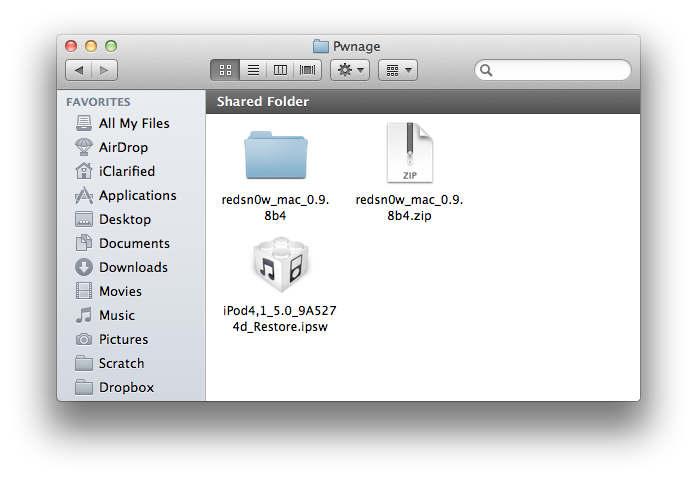
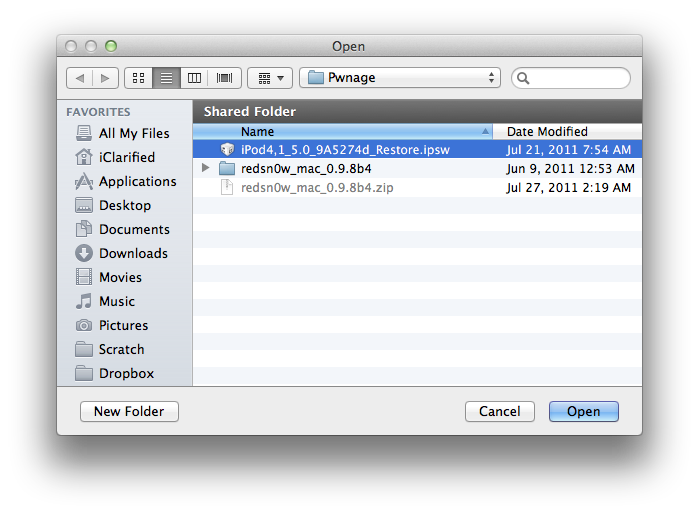
Create a folder on your desktop called Pwnage

Download RedSn0w from here and place it in the Pwnage folder. Likewise, download the latest 5.0 firmware from the iOS Dev Center and place it in the same folder.

5.0b4 (4G): iPod4,1_5.0_9A5274d_Restore.ipsw

Extract the RedSn0w zip file by double clicking it.

Click here to enlarge


Step Two
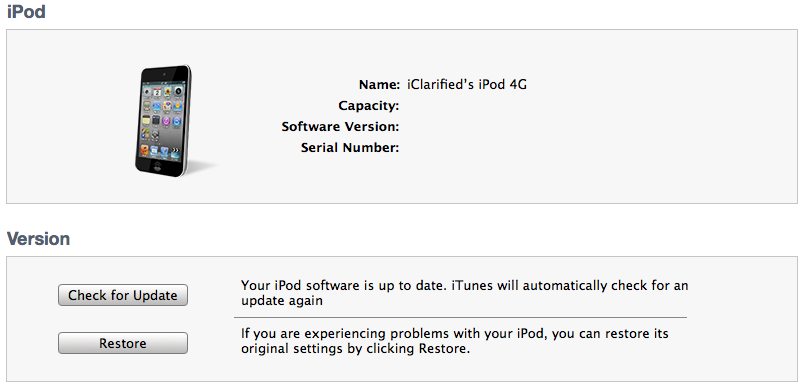
Connect your iPod to the computer and launch iTunes.

Click here to enlarge


Select your iPod from the list of devices on the left. Now hold down Option and click the Restore button. Restore is preferred as it won't create any wasted space on your iPod.


Click here to enlarge


Navigate to the Pwnage folder on your desktop and select the 5.0 firmware ipsw. Click the Choose button to continue.
Click here to enlarge

Step Three
Once iTunes has finished updating your iPod to the desired firmware open the Pwnage folder on your desktop and launch the redsn0w application from the redsn0w folder we extracted earlier.

Click here to enlarge

Step Four
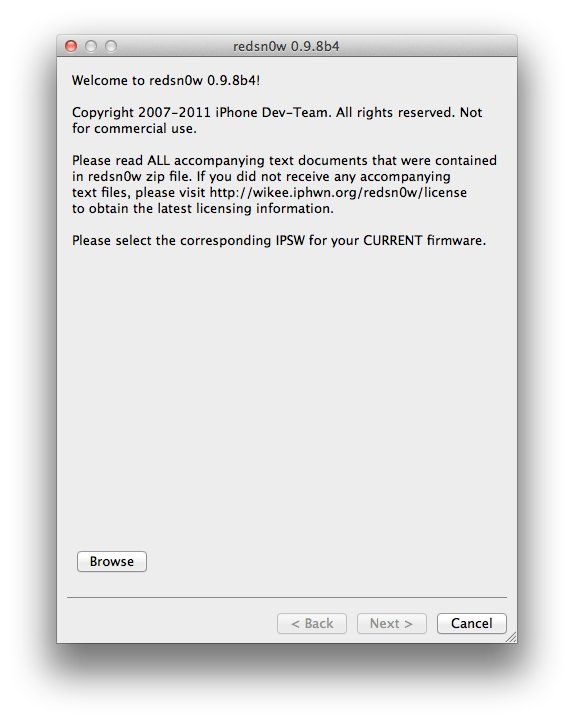
Once RedSn0w opens click the Browse button

Click here to enlarge

Step Five
Select the 5.0 firmware ipsw we placed in the Pwnage folder on our desktop then click Open.

Click here to enlarge

Step Six
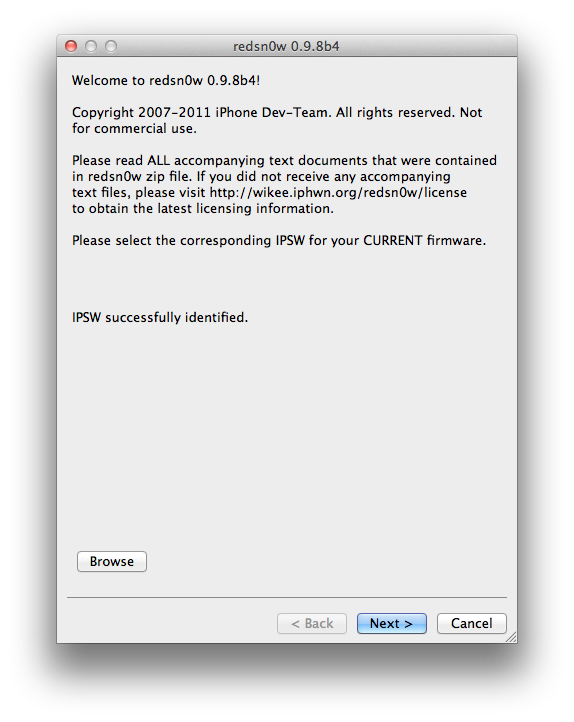
Once the firmware has been verified click the Next button to continue.

Click here to enlarge

Step Seven
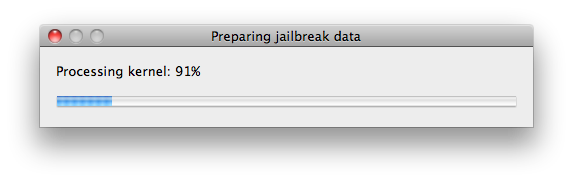
RedSn0w will now prepare the jailbreak data

Click here to enlarge

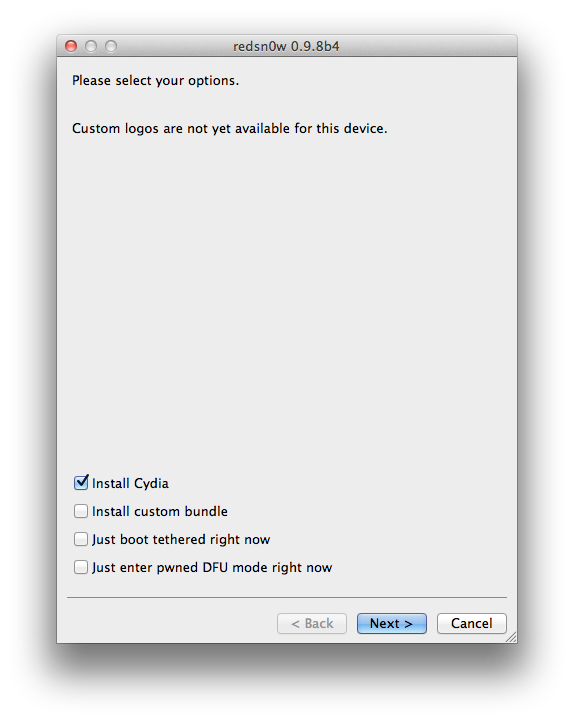
Step Eight
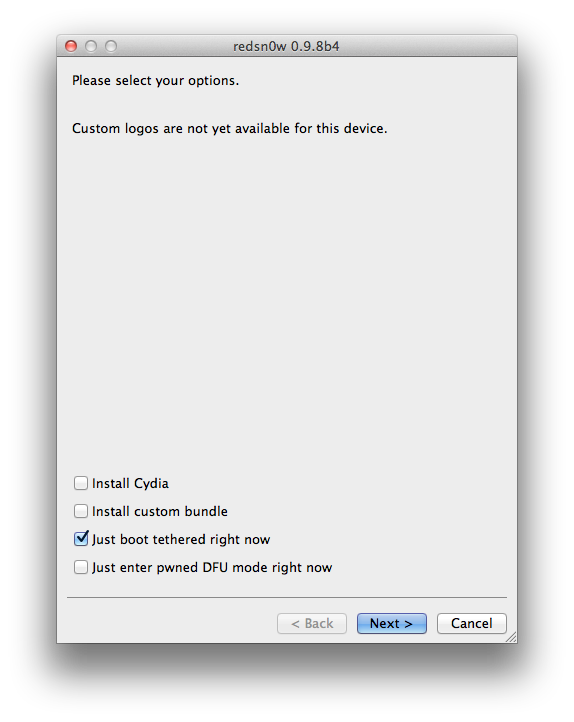
From this window you can select the jailbreak options you would like.

Make sure Cydia is selected and click the Next button to continue.

Click here to enlarge

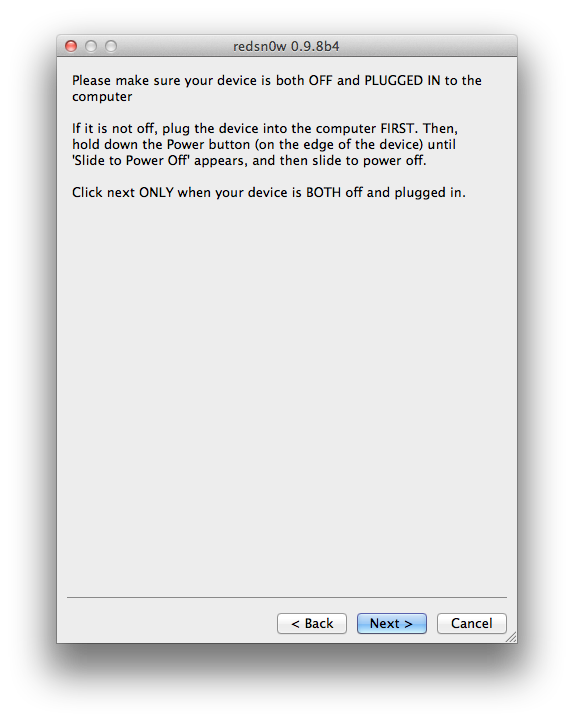
Step Nine
Please plug your iPod into the computer and make sure its OFF then click the Next button

Click here to enlarge

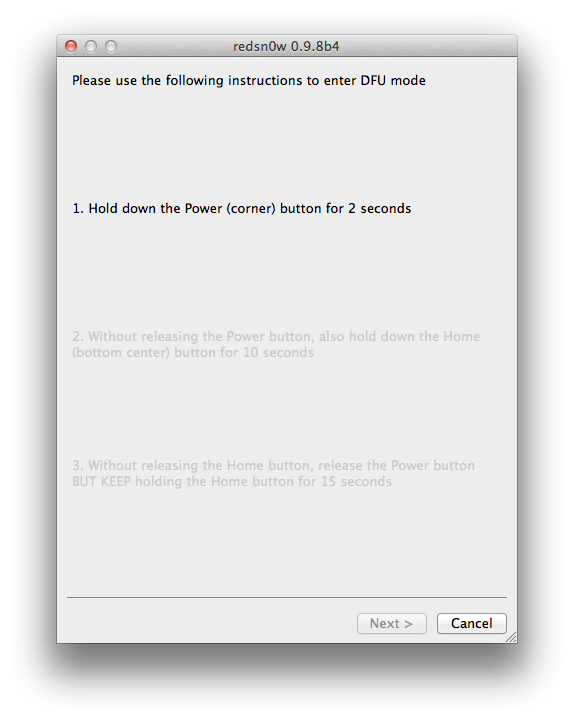
Step Ten
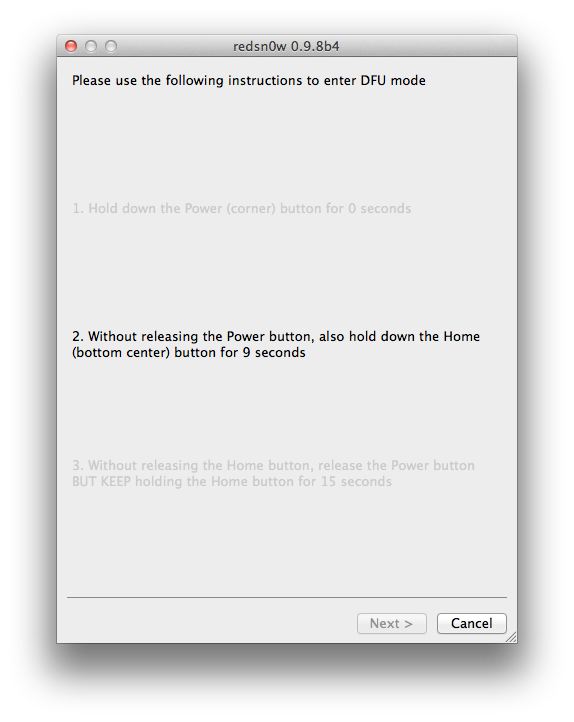
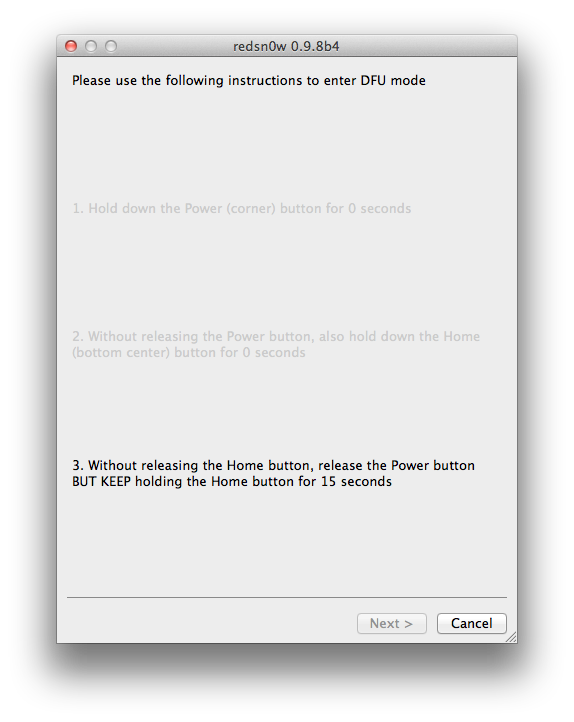
RedSn0w will now guide you through the steps to get into DFU mode.
Click here to enlarge

Hold down both the Home button and the Power button for 10 seconds.
Click here to enlarge

Release the Power button and continue holding the Home button until RedSn0w detects the device.

Click here to enlarge

Step Eleven
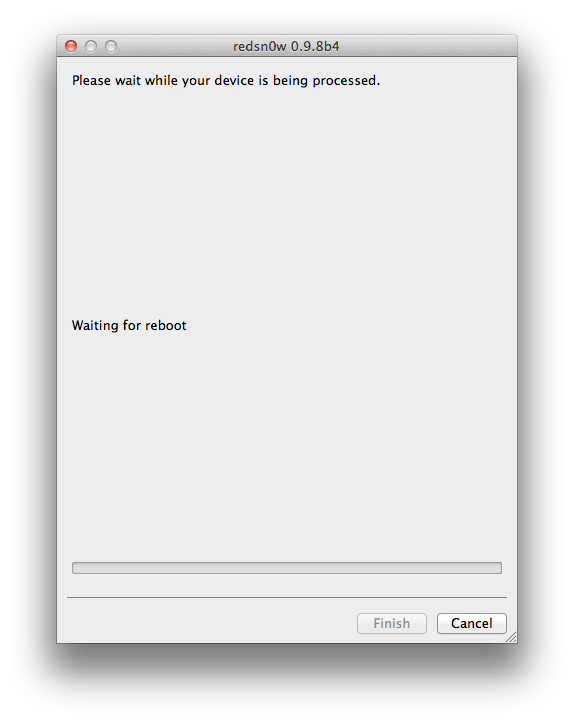
Your iPod will now reboot

Click here to enlarge


Step Twelve
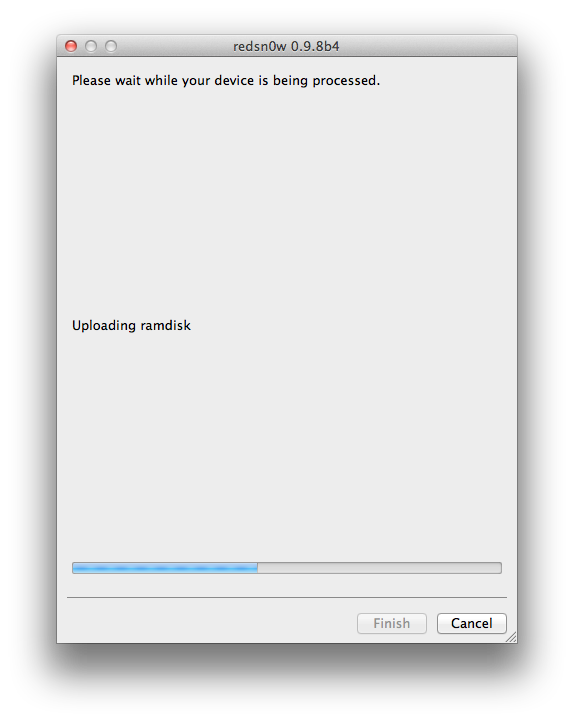
RedSn0w will then begin uploading the new RAM Disk and Kernel.

Click here to enlarge

Step Thirteen
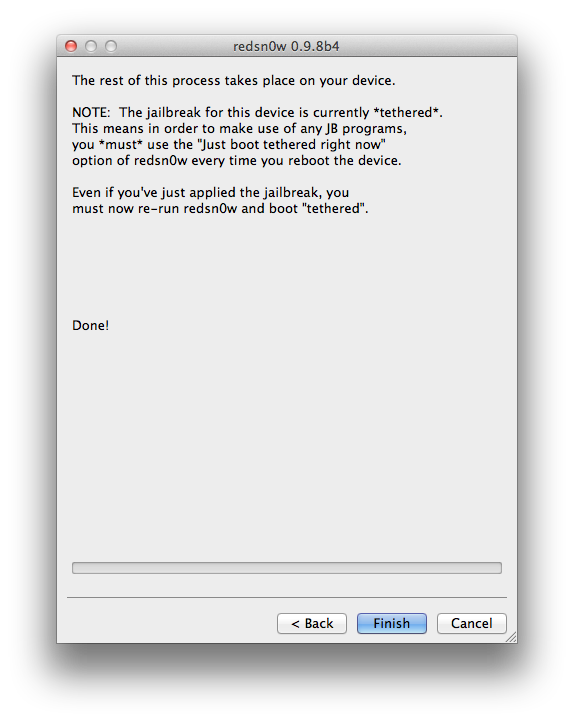
Once this is complete you will be notified that RedSn0w is done. Click the Finish button. When your iPod finishes rebooting (5 minutes or so) it will be jailbroken with Cydia on the SpringBoard.

Click here to enlarge


BOOT TETHERED:
Since this is a tethered jailbreak you must use Redsn0w to help you boot back into your jailbroken device if its powered off for any reason. Simply connect your iPod to the computer, launch RedSn0w, select Just boot tethered right now from the options window and click Next to have RedSn0w boot your device.

Click here to enlarge

*A big thanks to the iPhone Dev-Team and Geohot for their hard work and contribution to the iPhone community.
Continue reading →