Rabu, 13 Juli 2011

Apple News | iPhone Dev-Team Releases RedSn0w 0.9.8b2 to Fix Issues With iOS 5.0b3 Ja

Apple News | iPhone Dev-Team Releases RedSn0w 0.9.8b2 to Fix Issues With iOS 5.0b3 Jailbreak Tuesday, 12th July 2011, 03:07 am This entry needs translation. To help us and submit a translation please click here
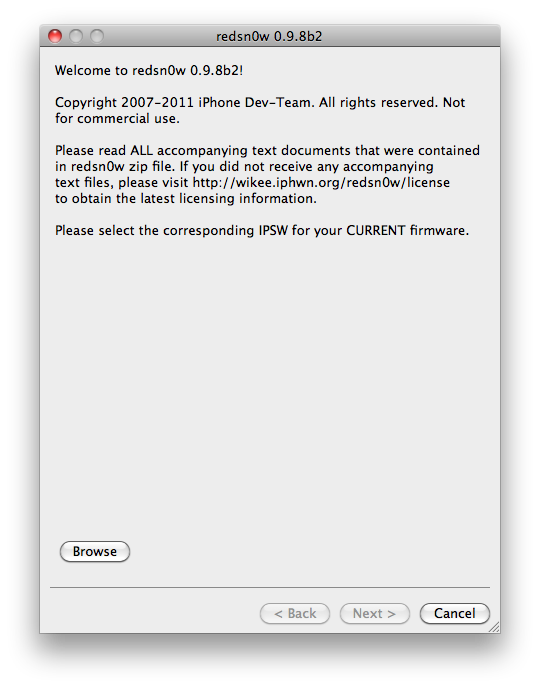
The iPhone Dev-Team has released RedSn0w 0.9.8b2 fix issues with running App Store apps after jailbreaking iOS 5.0b3.

redsn0w 0.9.8b2 http://******/6eek4Y should fix 50b3 App Store issue (if you're already JB, just use this to boot tethered)

You can download the updated RedSn0w from here: (Mac, Windows)

You can find instructions on how to jailbreak iOS 5.0 beta 3 here:
● iPhone 4 (Windows, Mac)
● iPhone 3GS (Windows, Mac)
● iPad 1 (Windows, Mac)
● iPod touch 4G (Windows, Mac)
● iPod touch 3G (Windows, Mac)


Continue reading →

Sn0wbreeze v2.8 [BETA 6]

Sn0wbreeze v2.8 [BETA 6]


CHANGES:


* Now jailbreaks iOS 5 beta 6.

* Still removes UDID Developer check + Beta timer.

* Still has the ability to hacktivate.

* Still preserves the baseband (as always!).

---------------------------------

Supported Devices and Tethered?

---------------------------------

* iPhone 3GS (old bootrom).....NO

* iPhone 3GS (new bootrom)....YES

* iPhone 4 (GSM)..............YES

* iPhone 4 (CDMA).............YES

* iPod Touch 3G...............YES

* iPod Touch 4................YES

* iPad 1G.....................YES


Continue reading →

Selasa, 12 Juli 2011

Redsn0w 0.9.8b2 released for iOS 5 beta 3 tethered jailbreak on iPhone, iPad and iPod touch

The iPhone Dev Team have updated their redsn0w jailbreak program. They have now released redsn0w 0.9.8 beta 2 for jailbreaking iOS 5 beta 3 tethered on iPhone, iPad and iPod touch. Redsn0w 0.9.8b2 is available for download on both Windows and Mac machines.


MuscleNerd, member of the iPhone Dev Team tweeted:
redsn0w 0.9.8b2 http://is.gd/6eek4Y should fix 50b3 App Store issue (if you're already JB, just use this to boot tethered)
Basically, those who had jailbroken iOS 5 beta 3 with redsn0w 0.9.8b1 were complaining that apps downloaded from the App Store were not opening. This is a sandbox issue, and to fix that, redsn0w 0.9.8b2 has been released which now recognizes the ipsws of all three iOS 5 betas. So when you follow our guide to jailbreak iOS 5 using redsn0w, just select the iOS 5 beta 3 ipsw and boot tethered. No need to re-run the jailbreak if you have already jailbroken iOS 5 beta 3 with redsn0w 0.9.8b1.

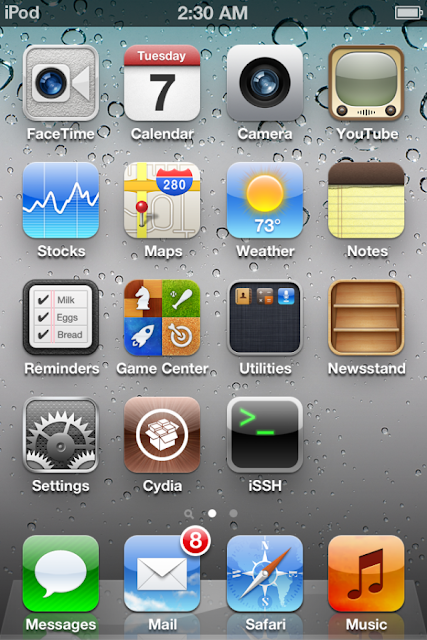
On the other hand, if you are doing a fresh jailbreak, then you obviously have to install Cydia. Do remember that this jailbreak is tethered and will require you to connect the device to the computer each time it has to boot up.

Download redsn0w 0.9.8b2 for Windows and Mac
Continue reading →

TinyUmbrella Updated To v5.00.04 With iOS5b3 Support

Click here to enlarge
Just a quick heads-up: notcom just updated TinyUmbrella to v5.00.04. The new updated brings support for iOS5b3 and fixes a stupid name encoding bug where folks would see their device name show up like this: “John‚Äôs iPad” instead of “John’s iPad”.

Download TinyUmbrella For Mac and Windows here
Continue reading →

Senin, 11 Juli 2011

Sn0wbreeze v2.8b4 Jailbreaks 5.0 beta 3

As you know if you read some of the earlier posts iOS 5 beta 3 is out now for developers. You can jailbreak it now using either redsn0w or newly updated sn0wbreeze. iH8sn0w just released version 2.8b4 as you can see in this tweet. I will leave you guys with the rest of the information below.


---------------------------------------------
sn0wbreeze v2.8b4 -- For iOS 5.0 b3(9A5259f)
---------------------------------------------
* Intended only for developers (as usual).
* Hacktivation is disabled (again).
* MAKE SURE YOU UPDATE TO iTunes 10.5 BETA 3!
---------------------------------------------
Supported Devices/Tethered?
---------------------------------------------
iPhone 3G[S] (old bootrom) [UNTETHERED]
iPhone 3G[S] (new bootrom) [TETHERED]
iPhone 4 (GSM) [TETHERED]
iPhone 4 (CDMA) [TETHERED]
iPod Touch 3G [TETHERED]
iPod Touch 4 [TETHERED]
iPad 1G [TETHERED]
---------------------------------------------
Those wondering, the jailbreakme exploit
cannot be integrated into applications
such as PwnageTool/redsn0w/sn0wbreeze.
---------------------------------------------
redsn0w seems to be having sandbox errors
due to it using the old b1 kernel.
I and many others have not seen any issues
with sn0wbreeze related to AppStore apps.
If you prefer to use redsn0w, I am sure
@MuscleNerd is working on a fix.
---------------------------------------------
Download --> http://is.gd/sb28b4
---------------------------------------------
//
Continue reading →

Jailbreak iOS 5 beta 3 - iPhone, iPod Touch, iPad - Redsn0w (Caution)

Jailbreak iOS 5 beta 3 - iPhone, iPod Touch, iPad - Redsn0w

Today the new Beta version of iOS 5 has been released named as iOS5 Beta 3. now there is need for most of the users of this new version of firmware to jailbreak their devices. There is good news for those that they can easily jailbreak the latest version of iOS 5 beta 3. There is no tool updated for the jailbreak, but the last version of Redsn0w that was released to jailbreak iOS 5 Beta 2 can jailbreak iOS Beta 3 as well. But this new version and jailbreak is only for developers. Here is the announcement made by MuscleNerd about the jailbreaking of new firmware.
Click here to enlarge
This jailbreak method is same as was in the past for Redsn0w by putting the device in DFU mode, but remember this jailbreak is also tethered.

Here is a bit guide about jailbreaking new version iOS 5 Beta 3. first update you iDevice with this latest firmware via iTunes. Then you need to run Redsn0w 0.9.8 and select the firmware iOS 5.0 beta1. if you select other firmware then you will not be able to jailbreak your device running iOS Beta3.

Click here to enlarge

Again this is tethered jailbreak, it means that every time you switch off your device, you will have to connect it to your PC and use the option “Just boot tethered right now” to use your device.
iOS 5 Beta 3 Can Be Jailbroken Using Redsn0w 0.9.8b1; But App Store Apps Are Not Working
Click here to enlarge
iOS 5 beta 3 that has just been seeded to developers of iOS developer program can be jailbroken using Redsn0w 0.9.8b1.iPhone Dev team had released Redsn0w 0.9.8b1 for Mac and Windows for iOS beta 1 for developers of jailbreak app developers so that they can test and debug their jailbreak apps and tweaks on iOS 5.


After upgrading your iOS device to iOS 5 beta, the trick is to point Redsn0w 0.9.8b1 to iOS 5 beta 1 firmware file to jailbreak it.MuscleNerd of the iPhone Dev Team has also confirmed this on Twitter:
Today's 5.0b3 can be jailbroken with last month's redsn0w http://is.gd/6eek4Y (point it at 5.0b1 IPSW..devs only please!)
But please proceed with caution if you’re not a jailbreak app developer as we’re hearing reports that App Store apps do not working after jailbreaking iOS 5 beta 3. ModMyI reports:
After playing around on iOS 5 beta 3 while jailbroken, it has been discovered that AppStore applications do not work. They crash and refuse to open. It is an issue that has been reported by a few people, including myself.
According to hacker, Clayton Braasch it is due to a sandboxing issue:
To reiterate: there's a sandbox issue causing App Store apps to crash after jailbreaking iOS 5 beta 3. Stay away if you're not a developer.
It needs to be seen if this is due to some anti-jailbreaking measure introduced by Apple in the latest iOS 5 beta.
Continue reading →

iOS 5 Beta 3 Whats New - Change Log

The new Beta version of iOS5 has been recently released for Developers by Apple. The final version of iOS will be released with the launch of new iPhone5 that is expected in September. Now we are going to demonstrate a number of new features that are introduced in iOS 5.0 Beta 3 firmware released today that is only for developers.

  • The new Beta version of firmware iOS5 is compatible with most of new iDevices like, iPhone 3GS and 4, iPod 3rd and 4th Gen and iPad 1st & 2nd Gen. these devices are now added to the list of 2nd generation Apple TV.
  • The new version of IMesage Beta3 is only for those who are running iOS 5 Beta 2 or iOS 5 beta 3.
  • There is a change like with the release of new version by Apple every time that you will new need to install iTunes 10.5 beta 3 to install firmware iOS5 Beta 3 to you iDevice.
  • The syncing of iPhone having iOS5 beta 3 is only possible with iTunes 10.5 Beta3.
  • There is a fix for Reminder App that had some bugs in using it.
  • Bugs to be found in Settings, MMs and Images in iOS 5 Beta 2 are resolved
  • It is easy to backup your data using iCloud.
  • There is draw back that MMS cannot send videos of longer length.
  • The editing function introduced in iOS5 that could remove red-eye deduction. The pictures edited with red-eye correction are synchronizing without changes applied.
  • There is a problem of synchronization. The solution is that you should restart you iPhone and resync.
  • The bug that did not allow the volume control to be used in videos is also fixed with the help of Cristian.
  • The new firmware is built A5259f
  • Fixed problems with video mirroring between 2 and Apple TV iPad
  • The icon of GPS on the status bar during the usage of Location service was resolved, a bug with twitter.·
  • The camera app was slow in older beta version that is now swift in opening and operations· Addition of a new screen about the information of usage of GPS by your iPhone.
Click here to enlarge
  • A change after a long time in ringtones, two new tones were added that have been been activated yet named as Tweet and Sherwood
  • The performance of this beta version is much better than the previous beta version Beta2.
  • The icon for Reminder app has been changed.
Click here to enlarge
  • New Menu settings "Location Settings". From here you can enable or disable some functions
Click here to enlarge
  • There is option to disable the voice roaming voice traffic to avoid the usage of the service by provider for some occasions.
  • It is good that you can easily clear cache and history of Safari.
  • Another change is that “iTunes Wi-Fi Sync” has replaced “Wi-Fi Sync Settings”
  • No issue in using FaceTime
  • WiFi to Sync screen is more clear.

Click here to enlarge
Continue reading →